Chronograph Explained: How to Use It (Plus 10 Common Mistakes to Avoid)
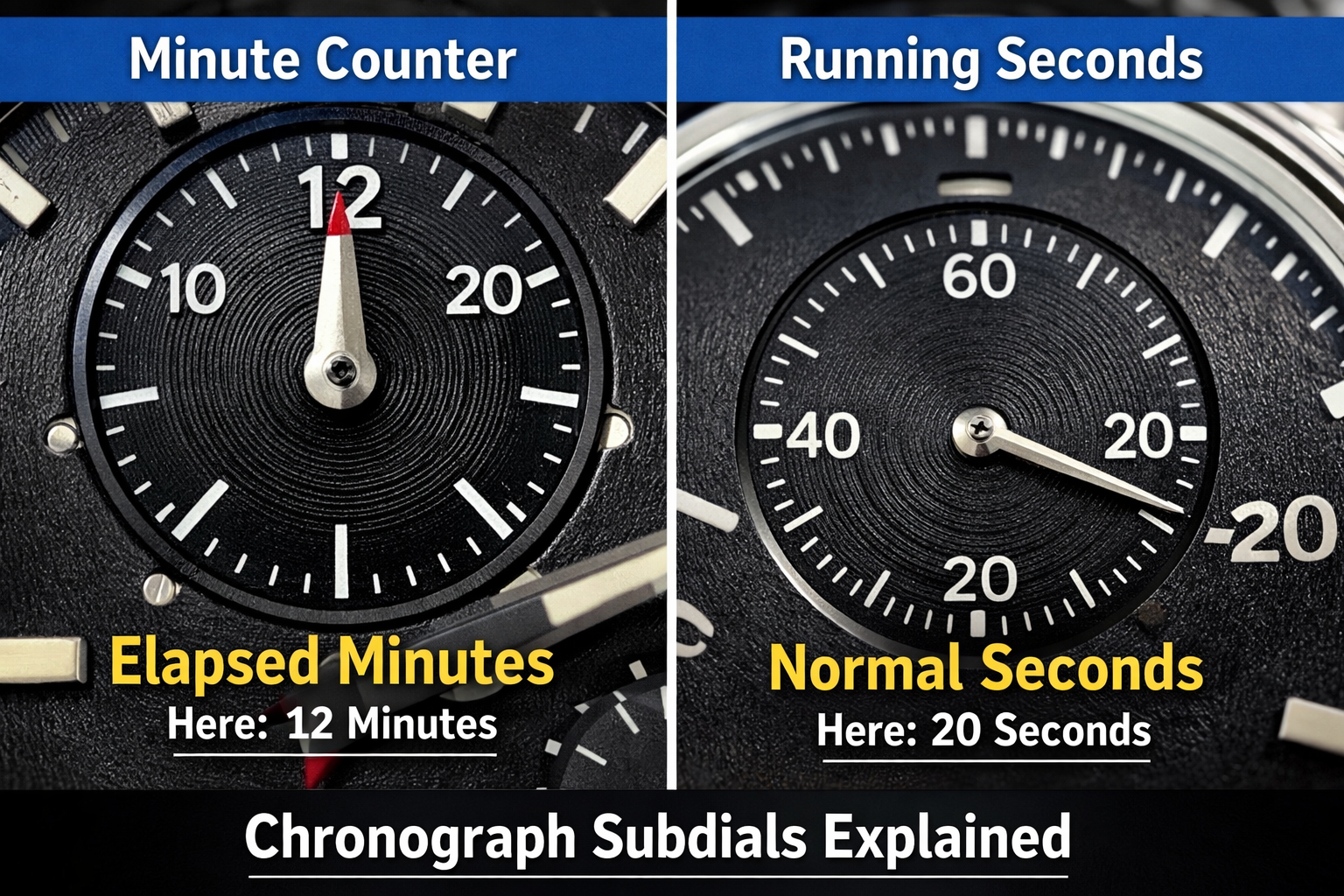 A chronograph is a watch with a built-in stopwatch. Most chronographs use two pushers: the top pusher starts/stops, and the bottom pusher resets. The large “seconds hand” on many chronographs is often the chronograph seconds hand, so it may stay still until you press start—this is normal.
What is a chronograph?
A chronograph is a timekeeping complication that measures elapsed time. Unlike a simple seconds hand, a chronograph adds:
-
Start/Stop control (usually top pusher)
-
Reset control (usually bottom pusher)
-
One or more subdials to count minutes and/or hours
Know your controls (most common layout)
Typical pusher functions
| Control | What it does | What you’ll see |
|---|---|---|
| Top pusher (2 o’clock) | Start / Stop | Large chrono seconds begins / freezes |
| Bottom pusher (4 o’clock) | Reset | Hands snap back to “zero” |
| Crown | Sets time/date | Normal time-setting functions |
Common subdial meanings
-
30-minute counter (often at 3 o’clock)
-
12-hour counter (often at 6 o’clock)
-
Running seconds (often at 9 o’clock)
Tip: On many chronographs, the small subdial is the regular seconds, while the big central seconds hand is for timing only.
How to use a chronograph (step-by-step)
1) Start timing
Press the top pusher once.
-
The chronograph seconds hand starts sweeping.
-
The minute counter begins advancing (often jumps once per minute).
2) Stop timing
Press the top pusher again.
-
The chronograph seconds hand stops exactly where it is.
-
Subdials freeze, showing elapsed minutes/hours.
3) Reset
Press the bottom pusher (only after stopping).
-
The chronograph seconds hand returns to 12 o’clock.
-
Subdials return to zero.
How to read elapsed time (quick examples)
Example A: Timing a 7-minute task
-
Chronograph seconds hand stops at 12 seconds
-
30-minute subdial shows 7 minutes
Result: 7 minutes 12 seconds
Example B: Timing a 1 hour 18 minute drive (chronograph with hour counter)
-
Hour counter: 1 hour
-
Minute counter: 18 minutes
-
Seconds: 05
Result: 1:18:05
Useful ways to use a chronograph in real life
-
cooking (steep time, boil time)
-
workouts (intervals, rest periods)
-
meetings/presentations
-
parking meter checks
-
travel time segments
10 common chronograph mistakes (avoid these)
Mistake #1: Pressing reset while the chronograph is running
This can stress the mechanism.
✅ Always stop first, then reset.
Mistake #2: Rapidly mashing pushers repeatedly
Chronographs are mechanical systems—treat pushers with controlled presses.
Mistake #3: Using pushers when they feel gritty or stuck
Sticky pushers can signal dirt, dried lubricant, or worn seals.
If it feels wrong, stop using it and service the watch.
Service timeline reference:
→How Often Should You Service a Mechanical Watch? A Practical Maintenance Timeline
Mistake #4: Leaving a mechanical chronograph running 24/7 (without reason)
Many watches can handle it, but it increases wear and reduces power reserve.
Better: use it when needed.
Mistake #5: Confusing “chrono seconds” with “normal seconds”
If the big seconds hand isn’t moving, that may be normal. Look for the small seconds subdial.
Mistake #6: Resetting repeatedly “to play with it”
It’s fun—but repeated resets add wear. Use it like a tool.
Mistake #7: Timing long events on a chrono with no hour counter
If your chrono only counts 30 minutes, you can’t accurately time a 2-hour event without tracking separately.
Mistake #8: Ignoring misalignment at zero
If the chronograph seconds hand doesn’t return to exactly 12, it may need adjustment (common, fixable).
Mistake #9: Not understanding your tachymeter (if present)
A tachymeter only works if you know the rule (see below). Misuse leads to nonsense readings.
Mistake #10: Skipping basic care
Dust, sweat, and grime around pushers/case edges can cause stickiness over time.
Daily care guide:
→ Everyday Watch Care Guide: How to Keep Your Watch Looking New
Common care mistakes:
→ Weekly Watch Care Routine: A Simple 10‑Minute System to Extend Your Watch’s Life
Tachymeter (optional feature) in 30 seconds
If your chronograph has a tachymeter scale, it estimates speed based on time to travel one unit distance (e.g., 1 km or 1 mile).
How it works:
-
Start chronograph at the start marker
-
Stop after traveling 1 km/1 mile
-
Read the number on the bezel where the seconds hand stops
That number ≈ speed per hour.
When should you service a chronograph?
Consider service if:
-
pushers feel sticky, gritty, or inconsistent
-
chronograph resets off-center
-
timing hand “stutters”
-
power reserve drops noticeably when chrono is used
Service guidance:
→ How Often Should You Service a Mechanical Watch? A Practical Maintenance Timeline
Storage also matters (dust/humidity/magnets in the environment):
→ How to Store Watches Properly When Not Wearing Them (2026)
FAQ
1) Why isn’t my chronograph seconds hand moving?
Often the large seconds hand is the chronograph hand and only moves after you press start. Look for a small seconds subdial.
2) Is it bad to leave a chronograph running all the time?
For many mechanical chronographs, it increases wear and reduces power reserve. Best to run it only when needed.
3) Can I press reset without stopping first?
Don’t. Stop first, then reset—this avoids unnecessary stress.
4) My chronograph doesn’t reset to 12 o’clock—what’s wrong?
Usually it needs a simple adjustment. If it worsens or other issues appear, consider service.
→ How Often Should You Service a Mechanical Watch? A Practical Maintenance Timeline
5) Does using the chronograph drain the battery (quartz)?
Yes, it can increase power consumption when running continuously. Turn it off when you’re done.
6) Can using the chronograph damage my watch?
Used correctly, it’s fine. Most damage comes from misuse (reset while running, forcing sticky pushers, excessive pressing).
→ Weekly Watch Care Routine: A Simple 10‑Minute System to Extend Your Watch’s Life